
Powering 600+ of websites
FilX - WordPress Blog & Post Filter Plugin by Category, Tag & Taxonomy
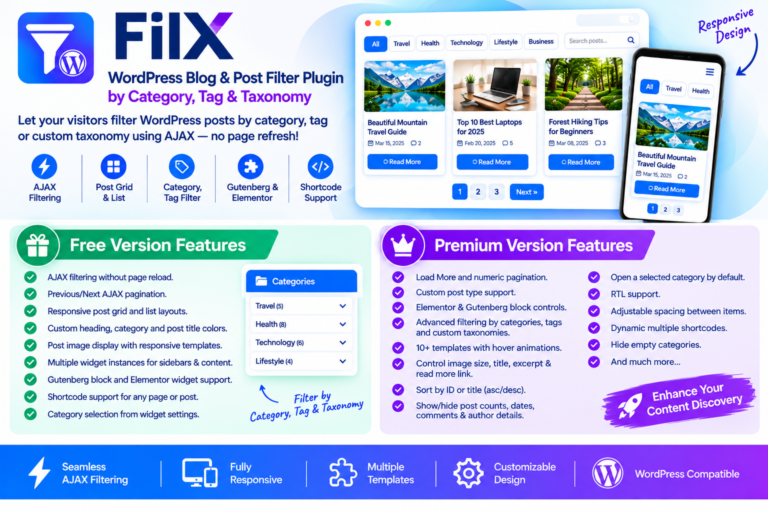
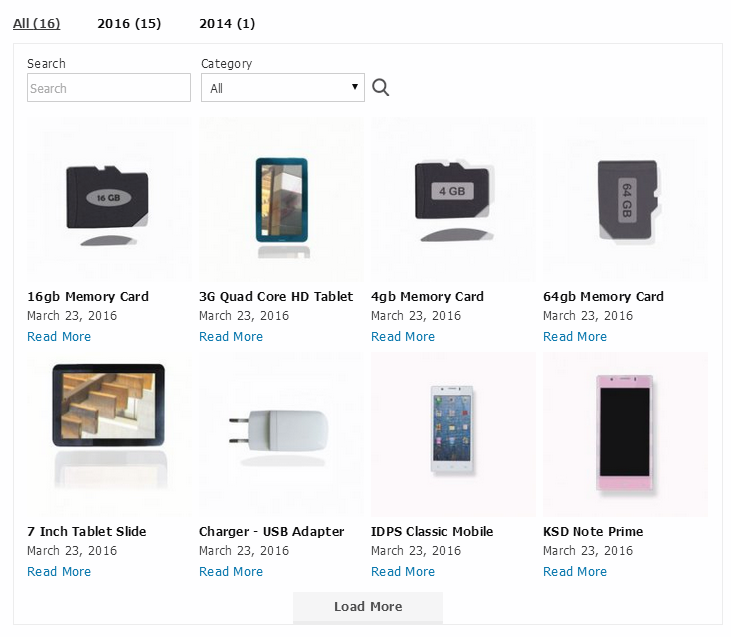
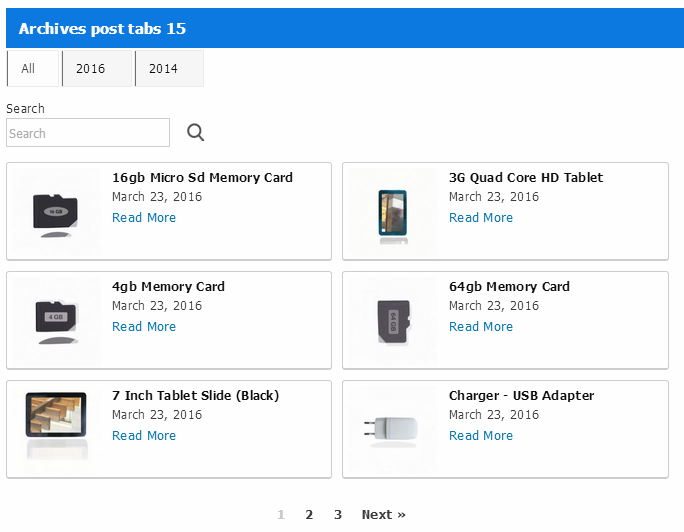
Make it easier for visitors to discover the content they are looking for with FilX, a WordPress blog filter plugin that lets you organize and display posts using category-based navigation and AJAX-powered filtering.
Whether you run a personal blog, news website, online magazine, or content-rich business website, FilX helps visitors explore relevant posts without repeatedly reloading the page. Create interactive post tabs and filterable post layouts using WordPress categories, tags, and custom taxonomies.
FilX gives you multiple ways to display filtered content through its Gutenberg block, dedicated Elementor widget, WordPress widget, and shortcode support. Customize post layouts, category tabs, colors, images, titles, and pagination to create a browsing experience that fits your website.
The free version provides AJAX-powered category filtering and Previous/Next pagination. With FilX Premium, you can extend your filtering options to include tags, custom taxonomies, custom post types, AJAX Load More, numeric pagination, and additional layout and display controls.
Give your visitors a simpler way to explore your WordPress content with FilX.
🚀 Main Features Overview
FilX combines dynamic post filtering, responsive layouts, and flexible WordPress integration in one plugin.
- ⚡ AJAX-Powered Post Filtering: Let visitors switch between post categories and view matching content without a full-page reload.
- 📂 Category-Based Filtering: Organize blog posts into selectable category tabs to make content easier to explore.
- 🏷️ Tag and Custom Taxonomy Filtering: Extend content discovery with tag and custom taxonomy filtering in the Premium version.
- 🧩 Custom Post Type Support: Display and filter custom post types with FilX Premium.
- 🎨 Responsive Post Templates: Present posts using responsive layouts with customizable visual elements.
- 🖼️ Post Featured Images: Display post images using responsive templates and available image display settings.
- 🔢 AJAX Pagination: Navigate through posts using Previous/Next pagination in the free version, with additional pagination options in Premium.
- ➕ Load More Functionality: Let visitors load additional posts without refreshing the page using Premium.
- 🧱 Elementor and Gutenberg Integration: Add post filtering through the dedicated Elementor widget and Gutenberg block.
- 🔗 Shortcode Support: Place FilX post tabs and filtered content in supported WordPress content areas.
- 📱 Multiple Widget Instances: Use multiple instances in different sidebars and content areas.
- 🎯 Flexible Display Settings: Adjust headings, category tabs, post titles, colors, spacing, and post information.
🆓 Free Version Features
The FilX free version provides the essential tools for creating AJAX-powered category filters and displaying WordPress blog posts in responsive layouts.
⚡ AJAX Category Filtering
Allow visitors to select a category and view the corresponding posts without refreshing the entire page. AJAX-powered filtering makes category navigation more convenient, particularly on websites with several content categories.
📂 WordPress Category Tabs
Choose the categories you want to display as navigation tabs. Visitors can switch between categories to discover related articles and other published content.
↔️ Previous/Next AJAX Pagination
Give visitors a convenient way to browse additional posts using Previous and Next pagination. The content updates through AJAX rather than requiring a complete page reload.
🎨 Customizable Tab and Post Colors
Adjust heading colors, category tab colors, and post title colors to complement your website’s visual design.
🖼️ Responsive Post Images and Templates
Display post images using responsive templates that adapt to different screen sizes. This helps maintain a consistent presentation across desktop, tablet, and mobile devices.
🧱 Gutenberg and Elementor Support
Add FilX content to your pages using its Gutenberg block and dedicated Elementor widget. These integrations make it easier to incorporate category-based post displays into your existing page layouts.
🔗 Shortcode Integration
Use the FilX shortcode to place category-based post tabs in supported WordPress content areas, including pages, posts, and templates.
📱 Multiple Widget Instances
Create multiple FilX widget instances for different website areas, such as sidebars, blog sections, and other supported content locations.
🔍 Category Selection Controls
Select the categories you want to include in your post display. This gives you control over which content visitors can access through the category tabs.
💎 FilX Premium Features
FilX Premium expands the free plugin with additional filtering capabilities, custom post type support, advanced pagination, and more detailed presentation controls.
It is suitable for websites that need more than basic category navigation and want greater control over how posts are filtered, organized, and displayed.
🔎 Advanced Filtering Capabilities
- 🏷️ Tag Filtering: Let visitors discover posts through WordPress tags, providing another way to navigate related content.
- 🧩 Custom Taxonomy Filtering: Filter posts using custom taxonomies registered on your WordPress website. This is useful for websites with specialized content classifications beyond standard categories.
- 📂 Advanced Category Filtering: Configure category-based filtering with additional display and selection options.
- 🧱 Custom Post Type Support: Display and filter registered custom post types instead of limiting your content displays to standard WordPress blog posts.
⚡ Advanced AJAX Pagination and Navigation
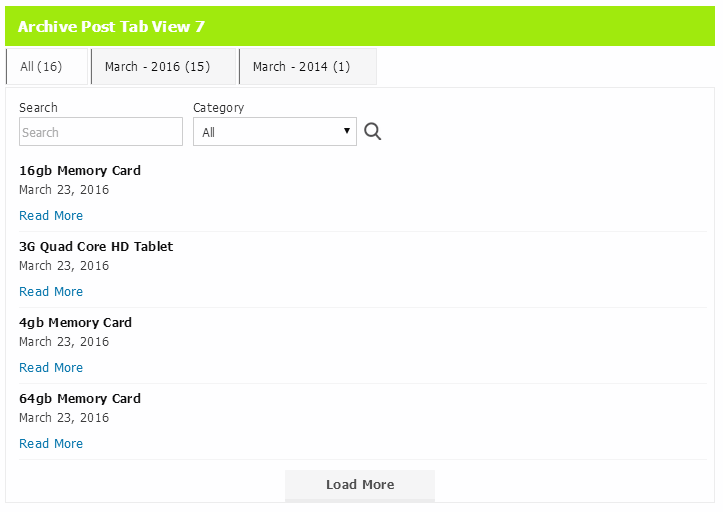
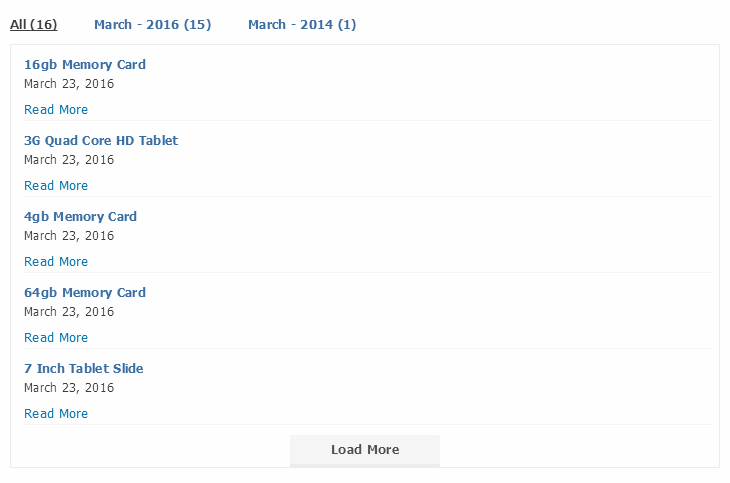
- ➕ AJAX Load More: Add a Load More option so visitors can retrieve additional posts without a full-page refresh.
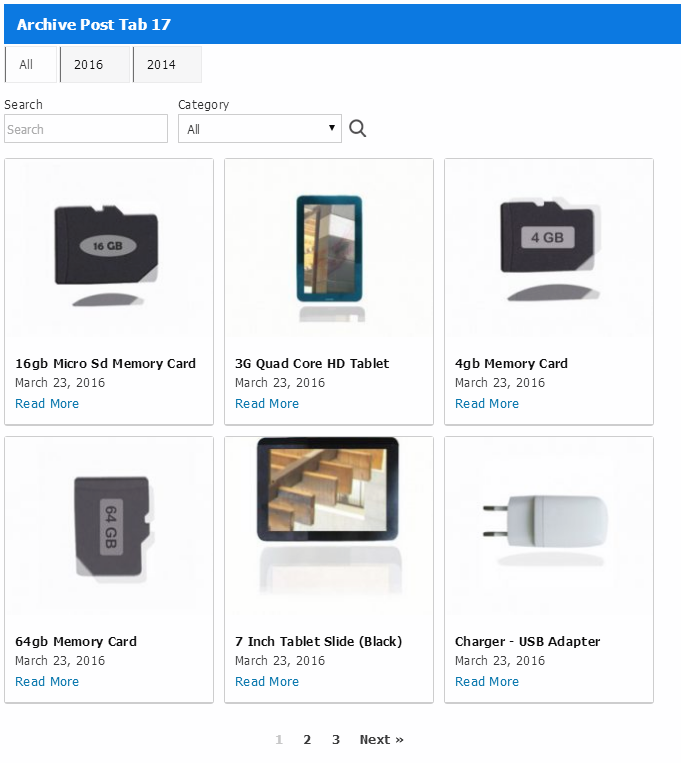
- 🔢 Numeric AJAX Pagination: Display numbered pagination controls that allow visitors to navigate between post pages using AJAX.
- ↔️ Previous/Next Pagination: Provide directional navigation between post collections.
- ⭐ Default Selected Category: Choose a category that should be selected when the post filter initially loads.
- 📂 All Tab Option: Add an All tab to let visitors view posts across the selected categories.
These navigation options help you organize larger post collections and give visitors different ways to explore available content.
🎨 Advanced Post Layouts and Design
- 🧱 Multiple Display Templates: Choose from additional presentation templates to create post displays that suit your website.
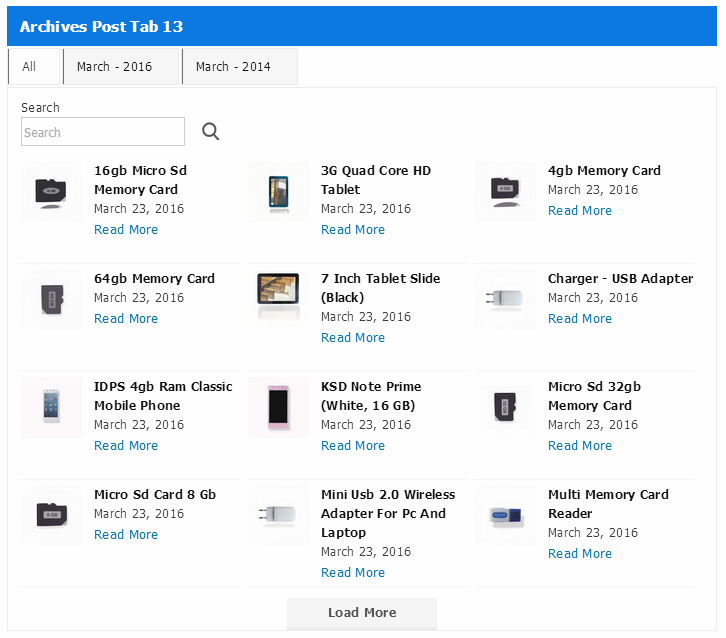
- 📋 List Layout: Present posts in a list-style arrangement for a more compact content browsing experience.
- 🔲 Grid Layout: Display posts in a structured grid that works well for blogs, magazines, and content landing pages.
- ✨ Hover Animation Layouts: Use additional hover animation options to enhance the visual presentation of post items.
- ↕️ Adjustable Post Spacing: Control the spacing between post items to create a more balanced layout.
- ↔️ RTL Support: Support right-to-left website layouts for languages that use RTL text direction.
🖼️ Post Content and Display Controls
- 📐 Image Size Control: Configure the image size used in your post display.
- 📝 Post Title Control: Customize whether post titles appear in your layout.
- 📄 Excerpt Display: Control the presentation of post excerpts to give visitors additional context about each article.
- 🔗 Read More Link: Configure the display of a Read More link to help visitors navigate to full articles.
- 📅 Post Date Visibility: Show or hide publication dates according to your layout requirements.
- 💬 Comment Count Visibility: Control whether comment information appears with your posts.
- 👤 Author Information Visibility: Show or hide author details in the post display.
- 🔢 Post Count Visibility: Control the display of category or post counts where supported.
- 👁️ Empty Category Visibility: Choose whether empty categories should appear in the filter.
- 🎯 Flexible Post Information: Select the post details that should be visible to visitors instead of displaying every available element.
⚙️ Advanced Sorting and Filter Configuration
- ↕️ Category Sorting: Sort categories by title or ID in ascending or descending order.
- 🔃 Post Sorting: Configure post ordering by title or ID in ascending or descending order.
- 🎯 Category Selection: Choose which categories are included in the filter.
- ⭐ Initial Category Selection: Set a default category for the initial post display.
- 📂 All Category Navigation: Provide an All tab to display posts from the selected categories.
These controls are particularly useful when managing larger content libraries where the order of categories and posts matters.
🧩 WordPress Integration and Shortcode Management
- 🧱 Elementor Widget Controls: Access supported FilX filtering and display settings through its Elementor widget.
- 📝 Gutenberg Block Controls: Configure supported FilX settings through its Gutenberg block.
- 🔗 Dynamic Multiple Shortcodes: Create multiple shortcode configurations for different content areas and post displays.
- 📱 WordPress Widget Support: Place multiple instances in supported widget areas.
🎯 Use Cases and Benefits
FilX can help different types of WordPress websites make their content easier to browse.
📚 Blog Websites
A blog covering technology, business, tutorials, lifestyle, and other subjects can use category tabs to separate its articles. Visitors can select a topic and explore relevant posts without navigating away from the page.
📰 News and Magazine Websites
News publishers and online magazines often organize content into multiple categories. FilX can display category-based post tabs and responsive post grids, making it easier for readers to explore different sections.
🎓 Educational and Tutorial Websites
Websites publishing tutorials, guides, and educational resources can organize their articles by subject. Premium tag and custom taxonomy filtering provides additional ways to classify and discover content.
🏢 Business and Corporate Websites
Businesses that publish industry updates, company news, case studies, or informational articles can use FilX to organize their blog content into accessible sections.
📂 Content Hubs and Landing Pages
If your website has multiple content categories, FilX can help you create a dedicated content discovery area with category tabs and filtered post displays.
📱 Sidebar Content Navigation
Use multiple widget instances to add relevant post filtering or category-based navigation in supported sidebar and content areas.
❤️ Benefits of Using FilX
- Better content discovery: Give visitors an easier way to find articles by selecting relevant categories, tags, or taxonomies.
- Convenient navigation: AJAX filtering updates the post display without requiring a full-page reload.
- Flexible content organization: Use standard WordPress categories or expand filtering with Premium tags and custom taxonomies.
- More control over presentation: Adjust colors, images, titles, excerpts, metadata, spacing, and templates.
- Flexible placement: Add filtered post displays through Elementor, Gutenberg, widgets, and shortcodes.
- Improved browsing workflow: Let visitors move between content collections using available pagination and Load More options.
- Adaptable layouts: Choose responsive post templates for different types of website content.
🛠️ How to Use FilX
Getting started with FilX involves installing the plugin, adding its post display to a page, and configuring the available settings.
Step 1: Install and Activate FilX
Install FilX through your WordPress dashboard or upload the plugin folder to your WordPress plugins directory. Activate it from the Installed Plugins screen.
Step 2: Open a Page or Post
Edit the WordPress page or post where you want to display the filtered blog posts.
Step 3: Add FilX to Your Content
Choose a supported integration:
- Use the dedicated FilX widget in Elementor.
- Add the FilX block in Gutenberg, where available.
- Add a Shortcode block or supported shortcode element to your content.
- Use a supported WordPress widget area.
Step 4: Configure the Post Display
Select the categories and configure the available post display settings, such as the template, number of posts, and visual appearance.
Premium users can also configure the additional tag, taxonomy, custom post type, pagination, and display options available in their version.
Step 5: Publish and Test
Publish or update the page and visit the front end of your website. Test the category filters and pagination to confirm that the post display works as expected.
Example FilX Shortcode
Use the following shortcode as a starting example:
[categoryposttab template="pane_style_2" number_of_post_display="8"]
This example specifies the pane_style_2 template and displays eight posts. Additional configuration should follow the available shortcode and plugin settings.
🧩 Compatibility and WordPress Requirements
FilX is designed for WordPress websites and offers multiple ways to display filtered post content.
Based on the supplied plugin information:
| Requirement | Supported information |
|---|---|
| Plugin type | WordPress content filtering plugin |
| Minimum WordPress version | 4.6 |
| Tested WordPress version | 7.1 (supplied listing; revalidate before publication) |
| Minimum PHP version | 7.4 |
| License | GPLv2 or later |
| Free filtering | Category filtering |
| Premium filtering | Tags, custom taxonomies, custom post types |
| AJAX | Supported |
| Elementor | Dedicated widget |
| Gutenberg | Block support |
| Shortcodes | Supported |
| WordPress widgets | Supported |
| RTL | Premium feature |
Theme-specific compatibility, third-party plugin integrations, and compatibility with particular caching or optimization plugins should be confirmed through testing before being advertised.
💡 Why Choose FilX?
Choosing a WordPress post filter plugin depends on the type of content you publish and how much control you need over its presentation.
FilX combines category-based post navigation with additional premium filtering options and flexible placement methods.
1. More than basic category navigation
Start with category filtering in the free version and extend your filtering options with Premium support for tags, custom taxonomies, and custom post types.
2. AJAX-powered browsing
Visitors can switch between available content categories and navigate posts without repeatedly loading the entire page.
3. Flexible WordPress placement
Use Elementor, Gutenberg, WordPress widgets, or shortcodes to incorporate post filtering into different parts of your website.
4. More control over post presentation
Customize templates, post images, titles, excerpts, metadata, colors, spacing, and pagination to suit your content layout.
5. Free and Premium options
Start with the free category filtering functionality and consider Premium when your website needs additional filtering and display controls.
FilX is a practical option for WordPress website owners who want to improve blog navigation and organize content without building a custom filtering interface from scratch.
❓ Frequently Asked Questions
1. What is FilX – WordPress Blog & Post Filter Plugin?
FilX is a WordPress plugin that lets visitors filter and browse blog posts using category-based tabs and AJAX-powered content updates. Its Premium version adds tag filtering, custom taxonomy filtering, custom post type support, and additional display options.
2. Can I filter WordPress posts by category using FilX?
Yes. The free version of FilX supports AJAX-powered category filtering. Visitors can select a category and view its associated posts without a full-page reload.
3. Does FilX support tag filtering?
Yes. Tag filtering is available in FilX Premium, allowing visitors to explore posts using WordPress tags.
4. Can I filter posts using custom taxonomies?
Yes. FilX Premium supports custom taxonomy filtering. This is useful for websites that organize content using custom classification systems beyond standard WordPress categories and tags.
5. Does FilX support custom post types?
Yes. FilX Premium supports custom post types, allowing you to display and filter supported registered content types beyond standard blog posts.
6. Does FilX use AJAX for post filtering?
Yes. FilX uses AJAX to update the post display when visitors interact with the available filters. This avoids a full-page reload during supported filtering and pagination actions.
7. Does FilX support AJAX Load More?
Yes. FilX Premium includes AJAX Load More functionality. Visitors can load additional posts without refreshing the page.
8. Can I use numeric AJAX pagination?
Yes. Numeric AJAX pagination is included in FilX Premium. It allows visitors to navigate through additional post pages using numbered pagination controls.
9. Can I use FilX with Elementor and Gutenberg?
Yes. FilX provides a dedicated Elementor widget and Gutenberg block support. You can also use its shortcode to place post displays in supported WordPress content areas.
10. How do I add a FilX post filter to a WordPress page?
Edit the page where you want to display the filter, add the appropriate FilX widget, block, or shortcode, and configure the available category and display settings. Then publish the page and test the filter on the front end.
11. Can I customize the appearance of filtered posts?
Yes. FilX provides post presentation and styling controls, including heading colors, category tab colors, post title colors, images, templates, and other display settings. Premium adds further template, spacing, and post information controls.
12. What are the minimum WordPress and PHP requirements for FilX?
The supplied plugin information specifies WordPress 4.6 or later and PHP 7.4 or later. The listed tested WordPress version is 7.1. Check the latest plugin release information before installing FilX on a production website.
🎉 Make Your WordPress Content Easier to Explore
Your website may contain hundreds of useful articles, tutorials, and resources, but visitors still need a convenient way to find the content that interests them.
FilX helps turn your WordPress blog posts into an organized, filterable content experience.
Start with AJAX-powered category filtering in the free version, or upgrade to FilX Premium for tag filtering, custom taxonomies, custom post types, advanced pagination, and additional display controls.
Whether you are building a blog homepage, a magazine-style content section, or a category-based resource hub, FilX gives you flexible tools to organize and present your WordPress posts.
Explore FilX and make content discovery simpler for your website visitors.
FilX - WordPress Blog & Post Filter Plugin by Category, Tag & Taxonomy
$28.00 Original price was: $28.00.$6.00Current price is: $6.00.
Purchase Includes
🗎 30-day money-back guarantee
🗎 Product updates and improvements
🗎 Customer documentation support
Plugin Version
🗎 Version 1.0.1
🗎 Last updated 1 month ago
🗎 WordPress version 4.0 or higher
🗎 Tested up to 7.1.2
🗎 PHP version 7.2 or higher
Excellent 4.9 of 5 stars rating
Based on 530+ real users reviews

4.9 of 5 (125 reviews)

5 of 5 (225 reviews)



We bring innovation and creative freedom to the WordPress ecosystem
Sapien sagittis interdum quisque urna luctus eget morbi vivamus eget cras scelerisque lectus proin aliquam erat pellentesque pellentesque sed lectus volutpat semper pellentesque aliquam in metus.
Join over 12,898 of customers that already building amazing websites