
Powering 600+ of websites
Tabs Plugin – Responsive Elementor Tabs Widget for WordPress
Organize your WordPress content with attractive, responsive category tabs using Tabs Plugin: Responsive Elementor Tabs Widget . This powerful and flexible Elementor tabs widget helps you display WordPress posts in interactive tabs, allowing visitors to browse content from different categories without navigating away from the current page.
Whether you manage a blog, news portal, magazine, business website, or content-rich landing page, this plugin makes it easier to organize and present your posts in a clean, user-friendly layout.
With AJAX-powered content loading, responsive post grids, list layouts, customizable colors, and multiple display options, you can create engaging responsive tabs that make browsing WordPress content more convenient.
The plugin supports multiple ways to add tabs to your website, including a dedicated Elementor widget, Gutenberg block, WordPress widget, and shortcode. You can choose the categories you want to display, customize the appearance, and control how posts appear inside each tab.
If you are looking for flexible tabs for Elementor , a responsive WordPress tab widget, or an easy way to display category-based posts, this plugin provides the essential tools to get started.
🚀 Main Features of the Responsive Elementor Tabs Plugin
Create interactive WordPress category tabs with useful customization and content display options.
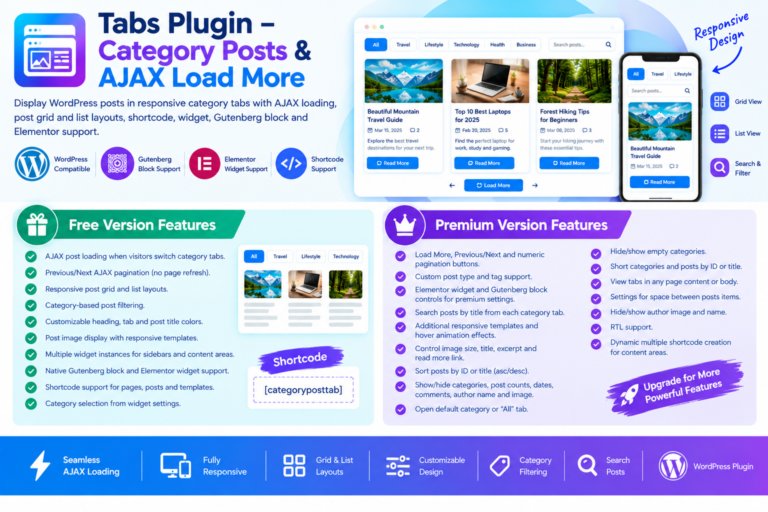
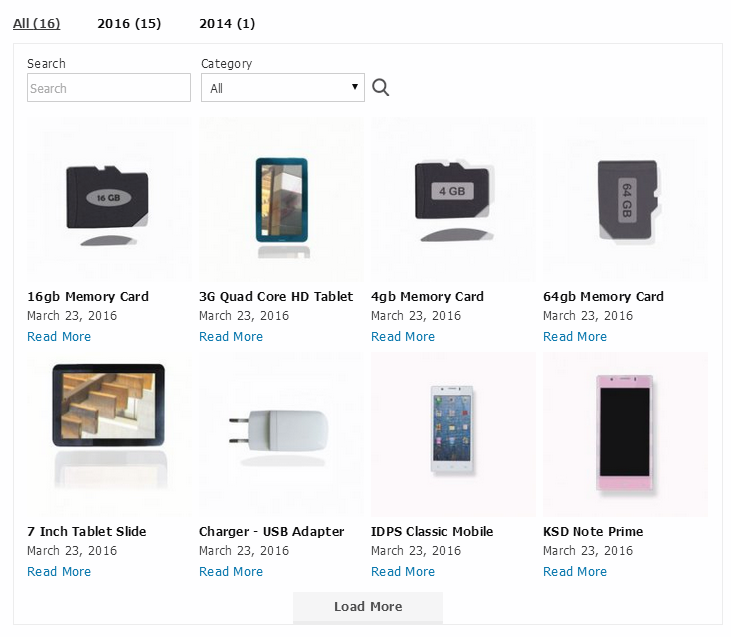
- ⚡ AJAX-Powered Post Loading: Load posts dynamically when visitors switch between category tabs, without refreshing the entire page.
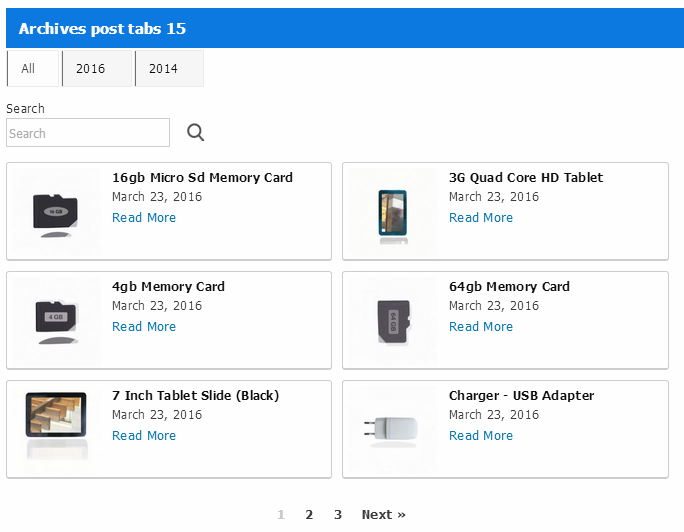
- ↔️ AJAX Previous/Next Pagination: Let visitors browse additional posts using Previous and Next pagination buttons.
- 🧩 Responsive WordPress Post Tabs: Display category-based content in responsive tab layouts suitable for different screen sizes.
- 🎨 Customizable Colors: Customize heading colors, category tab colors, and post title colors to complement your website design.
- 🖼️ Post Images and Responsive Templates: Display featured post images using responsive templates and attractive content layouts.
- 📱 Multiple Widget Instances: Add multiple instances of the widget to different sidebars and content areas.
- 🧱 Gutenberg and Elementor Support: Add post tabs through a native Gutenberg block or the dedicated Elementor tabs widget.
- 🔗 Shortcode Integration: Place category tabs inside pages, posts, and supported templates using a simple shortcode.
- 🔎 Category Selection: Choose which WordPress categories should appear in your tabs directly from the widget settings.
🆓 Free Version Features – Create Responsive WordPress Tabs
The free version includes essential tools to create category-based post tabs and display your WordPress content in an organized format.
⚡ Interactive Tabs and AJAX Content Loading
- ⚡ AJAX Category Tab Switching: Visitors can switch between categories and view relevant posts without a full page refresh. This creates a smoother browsing experience and keeps content accessible within the same page.
- ↔️ Previous/Next AJAX Pagination: Include Previous and Next buttons to help visitors navigate through additional posts loaded within a category tab.
🎨 Responsive Post Display and Customization
- 📱 Responsive Tab Layouts: Present category tabs and their associated posts in layouts designed to adapt to different screen sizes.
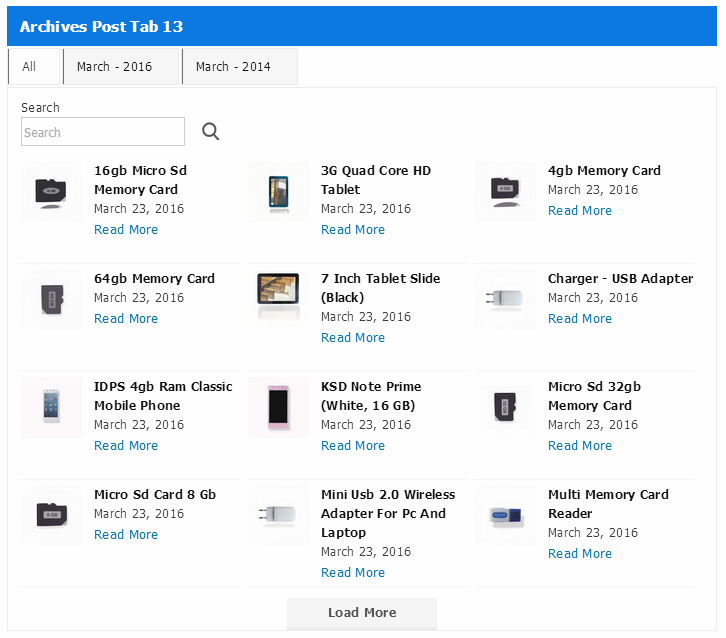
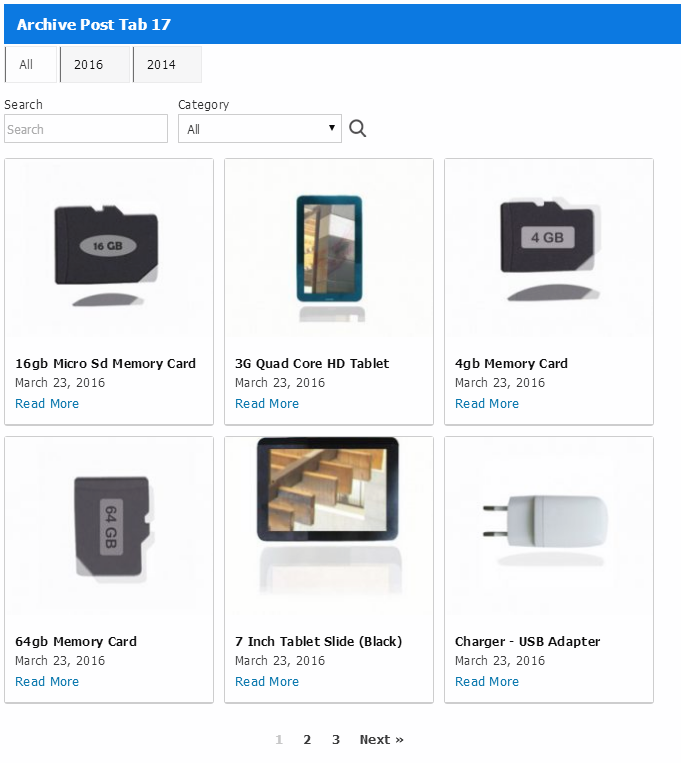
- 🧩 Post Grid Layout: Organize posts in a structured grid, making it easier for visitors to explore multiple articles.
- 🖼️ Post Image Display: Show post images alongside your content to create more visually engaging tab sections.
- 🎨 Custom Heading Colors: Adjust heading colors to match your website’s visual style.
- 🎨 Category Tab Colors: Customize category tab colors to make navigation clearer and more consistent with your design.
- ✏️ Post Title Colors: Change post title colors to maintain a cohesive appearance across your content sections.
🛠️ Easy WordPress Integration
- 🧱 Elementor Tabs Widget: Add category-based post tabs directly through the Elementor widget.
- 🧱 Gutenberg Block Support: Use the native Gutenberg block to add the tab functionality to your WordPress content.
- 🔗 Shortcode Support: Insert tabs into pages, posts, and supported templates using shortcode.
- 📱 Multiple Widget Instances: Display different tab sections in multiple widget areas, including sidebars and other content sections.
- 🔎 Category Selection Settings: Select the categories you want to display and organize your content around relevant topics.
💎 Premium Features – Advanced Elementor Tabs and Post Filtering
Take your WordPress tab functionality further with premium features designed to provide more control over content filtering, post presentation, pagination, and customization.
The premium version extends the plugin’s capabilities, making it easier to create advanced Elementor tab widget layouts and organize posts from categories, tags, and custom post types.
⚡ Advanced AJAX Pagination Options
Give visitors more flexibility when browsing posts with additional AJAX pagination styles.
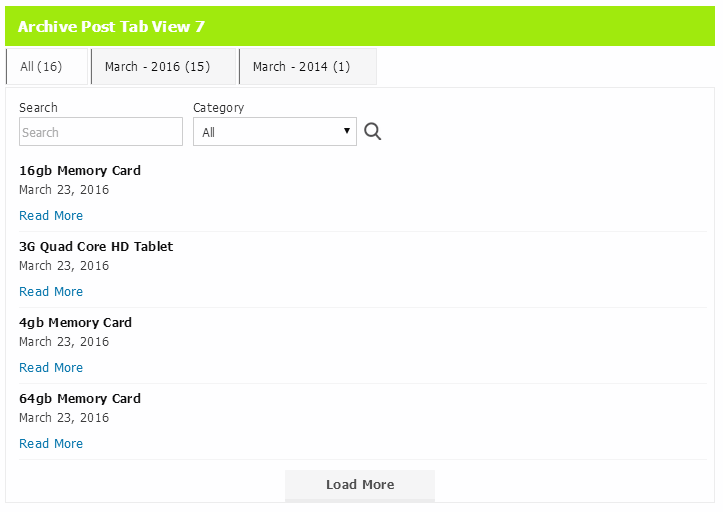
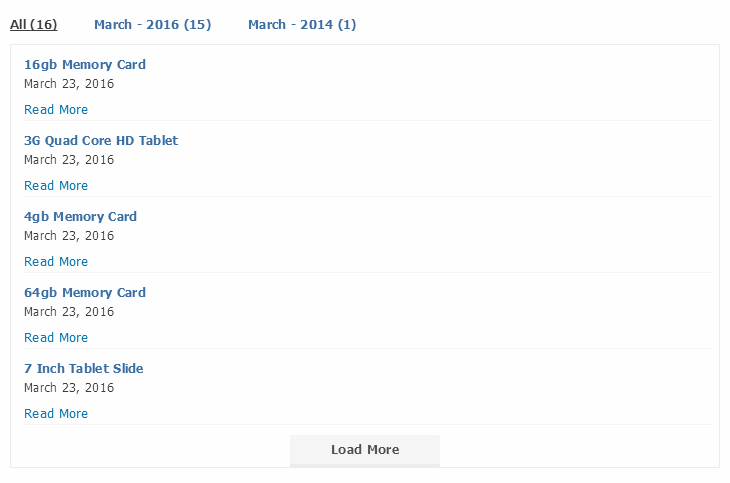
- ⚡ Load More AJAX Button: Allow visitors to load additional posts by clicking a Load More button instead of navigating through traditional page links.
- ↔️ Previous/Next AJAX Buttons: Provide Previous and Next navigation controls for browsing posts within category tabs.
- 🔢 Numeric AJAX Pagination: Display numbered pagination buttons so visitors can navigate between different sets of posts.
These pagination options help you choose a browsing experience that suits your website’s content structure and design.
🧩 Advanced Content Filtering and Post Types
Display content from more than standard WordPress categories with additional filtering options.
- 📂 Custom Post Type Support: Display content from custom post types, allowing you to use the tab widget for different types of WordPress content.
- 🏷️ Tag Support: Organize and display posts based on tags, giving visitors another way to explore related content.
- 🔎 Post Title Search: Add a search option within category tabs so visitors can find relevant posts by searching for post titles.
These features are useful for websites with large content libraries, multiple topics, or different types of published content.
🧱 Advanced Elementor and Gutenberg Controls
Get additional configuration options when building your pages with popular WordPress content editors.
- 🧱 Premium Elementor Widget Controls: Access premium configuration options through the Elementor widget to customize your tab and post display settings.
- 🧱 Premium Gutenberg Block Controls: Configure premium plugin settings through the Gutenberg block for a more flexible editing experience.
These controls make it easier to manage advanced tab configurations directly within your preferred WordPress editing environment.
🎨 Additional Templates and Layout Customization
Choose from additional designs to present your posts in a layout that matches your website.
- 🎨 Additional Tab Templates: Access more template options to create different visual styles for your category tabs.
- 📋 List Layout Templates: Display posts in an organized list format for content-focused sections.
- 🧩 Grid Layout Templates: Present posts in grid layouts to make better use of available content space.
- ✨ Hover Animation Layouts: Use hover animation layouts to add interactive visual effects when visitors interact with post items.
- ↕️ Adjustable Item Spacing: Control the spacing between post items to create a more balanced content presentation.
🖼️ Detailed Post Display Controls
Customize the information displayed within each post item and control how visitors interact with your content.
- 🖼️ Image Size Controls: Adjust the image size used in post layouts to suit your preferred presentation.
- ✏️ Post Title Controls: Configure how post titles appear within the tab content.
- 📚 Excerpt Controls: Manage post excerpts to provide visitors with additional information before they open an article.
- ↔️ Pagination Display Controls: Customize pagination settings to suit your selected navigation style.
- 🔗 Read More Link Controls: Configure the Read More link to give visitors a clear way to access full articles.
These options help you create post sections that display the right amount of information without making your pages unnecessarily cluttered.
🔍 Category and Post Sorting Options
Organize your tab navigation and post listings using flexible sorting controls.
- ↕️ Category Sorting: Sort categories by title or ID in ascending or descending order.
- 📚 Post Sorting: Arrange posts by title or ID in ascending or descending order.
These sorting options are especially useful when managing websites with multiple categories and large numbers of posts.
👁️ Content Visibility Controls
Choose which additional information appears in your category tabs and post listings.
- 👁️ Post Count Visibility: Show or hide the number of posts associated with categories.
- 📂 Empty Category Visibility: Choose whether empty categories should appear in the tab navigation.
- 📅 Date Visibility: Show or hide post publication dates.
- 💬 Comment Visibility: Control whether comment information appears with posts.
- 👤 Author Details Visibility: Show or hide author information within post layouts.
These settings help you create a cleaner content presentation while displaying only the information relevant to your website visitors.
⭐ Advanced Tab Navigation Settings
Customize how visitors interact with category tabs.
- ⭐ Default Selected Category: Choose a specific category to open automatically when visitors first view the tab section.
- 📂 All Tab Option: Add an All tab to display posts from all selected categories in one place.
These options make it easier to guide visitors toward important content while still allowing them to explore other categories.
🌐 RTL and Advanced Shortcode Features
Get additional flexibility when using the plugin across different website layouts and content areas.
- ↔️ RTL Support: Support right-to-left layouts for websites that use RTL languages.
- 🔗 Dynamic Multiple Shortcode Creation: Create multiple shortcodes dynamically for use in different content areas, making it easier to configure separate tab sections throughout your website.
🎯 Use Cases – Where Can You Use Elementor Responsive Tabs?
The Tabs Plugin is suitable for different types of WordPress websites that need organized, category-based content navigation.
📰 Blog Homepages and Content Websites
Display posts from different blog categories in separate tabs. Visitors can explore topics such as tutorials, guides, reviews, news, and updates without leaving the homepage.
🗞️ News and Magazine Websites
Organize articles into category tabs so readers can quickly browse different news sections, editorial topics, and magazine content.
📚 Content Hubs and Knowledge Sections
Create organized content sections for websites that publish articles across multiple categories. The post search and filtering options in the premium version provide additional ways to explore content.
🛍️ WooCommerce and Business Websites
Use category-based post tabs to organize supporting blog articles, buying guides, business updates, and informational content alongside your website’s other sections.
📱 Sidebars and Compact Content Areas
Add multiple widget instances to sidebars and other content areas to display relevant posts without dedicating an entire page to each category.
🎨 Elementor Landing Pages
Add an Elementor tab widget to your landing pages to organize articles and category-based content in an interactive layout.
🛠️ Compatibility and Integration
The Tabs Plugin offers multiple ways to add responsive category tabs to your WordPress website.
- 🧱 Elementor: Use the dedicated Elementor widget to add and configure category tabs.
- 🧱 Gutenberg Editor: Add tabs using the native Gutenberg block or a Shortcode block.
- 🔗 WordPress Shortcodes: Insert the tab section into pages, posts, and supported templates.
- 📱 WordPress Widget Areas: Add multiple widget instances to sidebars and other content areas.
- 🏷️ WordPress Categories: Select categories to display as individual tabs.
- 🧩 Custom Post Types and Tags: Premium users can extend content filtering beyond standard categories.
Example Shortcode
Use the following shortcode to display category-based post tabs:
[categoryposttab template="pane_style_2" number_of_post_display="8"]
Add the shortcode to a Gutenberg Shortcode block, Elementor shortcode element, or another supported page builder shortcode element.
You can then select categories, choose the tab layout, and configure the available display settings.
⚡ How to Create Responsive Elementor Tabs in WordPress
Getting started with the plugin is straightforward.
- Install the Plugin: Install it from WordPress Dashboard → Plugins → Add New, or upload the plugin folder to your WordPress installation.
- Activate the Plugin: Navigate to Plugins → Installed Plugins and activate Tabs Plugin.
- Edit Your Page: Open the page or post where you want to display category tabs.
- Add the Shortcode: Insert a Gutenberg Shortcode block, Elementor shortcode element, or another supported page builder shortcode element.
- Paste the Shortcode: Add
[categoryposttab template="pane_style_2" number_of_post_display="8"]. - Configure Your Tabs: Select the categories, choose your tab layout, and adjust the available display settings.
- Publish Your Page: Save or publish the page to display your responsive category tabs.
You can also use the dedicated Elementor widget or Gutenberg block to add the plugin’s tab functionality through the corresponding editor.
❤️ Why Choose Tabs Plugin: Responsive Elementor Tabs Widget?
Choosing the right tab widget can make a difference in how visitors explore your website’s content. This plugin combines category-based navigation, AJAX loading, and flexible display options in one WordPress solution.
Here are some reasons to consider using it:
- 🚀 Better Content Organization: Arrange WordPress posts into category tabs instead of displaying every article in one long content section.
- ⚡ AJAX-Based Navigation: Let visitors switch categories and browse additional posts without a full page refresh.
- 📱 Responsive Presentation: Display posts using responsive tab and content layouts.
- 🎨 Flexible Design Options: Customize colors, templates, post images, and other display settings.
- 🧩 Multiple Integration Options: Add tabs using Elementor, Gutenberg, shortcodes, and WordPress widget areas.
- 🔎 Advanced Content Discovery: Use premium search, category filtering, tags, and custom post type support to organize larger content libraries.
- 💎 More Display Control: Manage sorting, pagination, visibility settings, and post information with premium features.
- 🛠️ Flexible Content Placement: Use multiple widget instances and dynamic shortcode creation to add different tab sections throughout your website.
Whether you need a simple WordPress category tab widget or more advanced nested tabs Elementor alternatives for organizing category-based post content, this plugin offers practical options for building interactive content sections.
🎉 Get Started with Responsive Elementor Tabs Today!
Make your WordPress content easier to browse with Tabs Plugin: Responsive Elementor Tabs Widget .
Start with the free version to display posts in responsive category tabs with AJAX loading, customizable colors, post grid layouts, and Elementor, Gutenberg, and shortcode support.
Need more control? Upgrade to the premium version to access advanced AJAX pagination, custom post type and tag support, post title search, additional templates, sorting options, visibility controls, and more.
Explore the plugin and choose the features that best suit your website.
- 🎨 Live Demo: https://demo.aksharaddons.com/tabs-plugin-responsive-elementor-tabs-widget
- 📚 Documentation: https://www.aksharaddons.com/documentation/tabs-plugin-responsive-elementor-tabs-widget
- 🛠️ Support: https://www.aksharaddons.com/support-request/
Give your visitors a more organized way to explore your WordPress posts with responsive, customizable, and interactive category tabs!
Tabs Plugin – Responsive Elementor Tabs Widget for WordPress
$28.00 Original price was: $28.00.$6.00Current price is: $6.00.
Purchase Includes
🗎 30-day money-back guarantee
🗎 Product updates and improvements
🗎 Customer documentation support
Plugin Version
🗎 Version 1.0.1
🗎 Last updated 1 month ago
🗎 WordPress version 4.0 or higher
🗎 Tested up to 7.1.2
🗎 PHP version 7.2 or higher
Excellent 4.9 of 5 stars rating
Based on 530+ real users reviews

4.9 of 5 (125 reviews)

5 of 5 (225 reviews)



We bring innovation and creative freedom to the WordPress ecosystem
Sapien sagittis interdum quisque urna luctus eget morbi vivamus eget cras scelerisque lectus proin aliquam erat pellentesque pellentesque sed lectus volutpat semper pellentesque aliquam in metus.
Join over 12,898 of customers that already building amazing websites